
Built for dance studios and music schools
Less paperwork. Fewer group texts. More time to grow your studio.
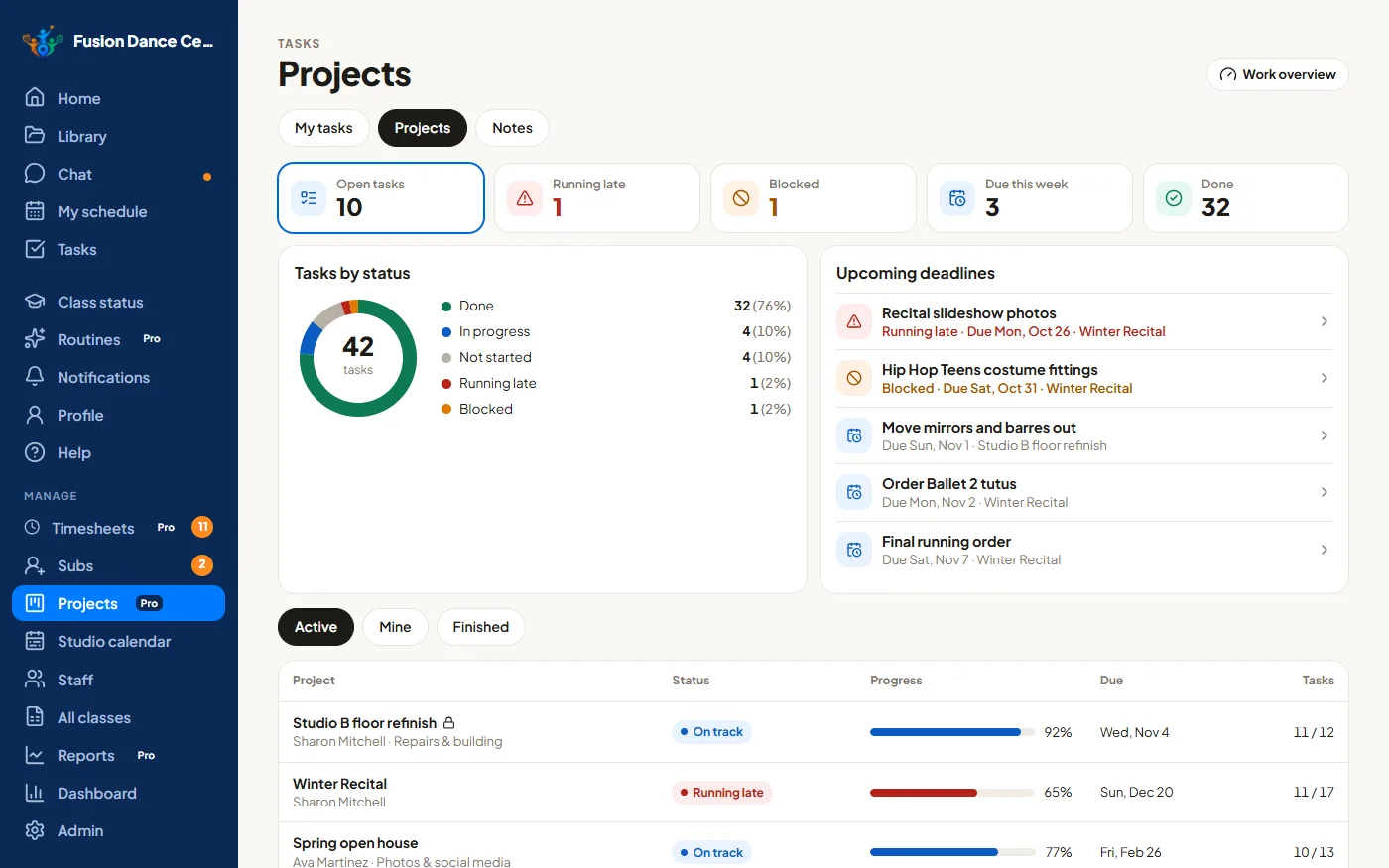
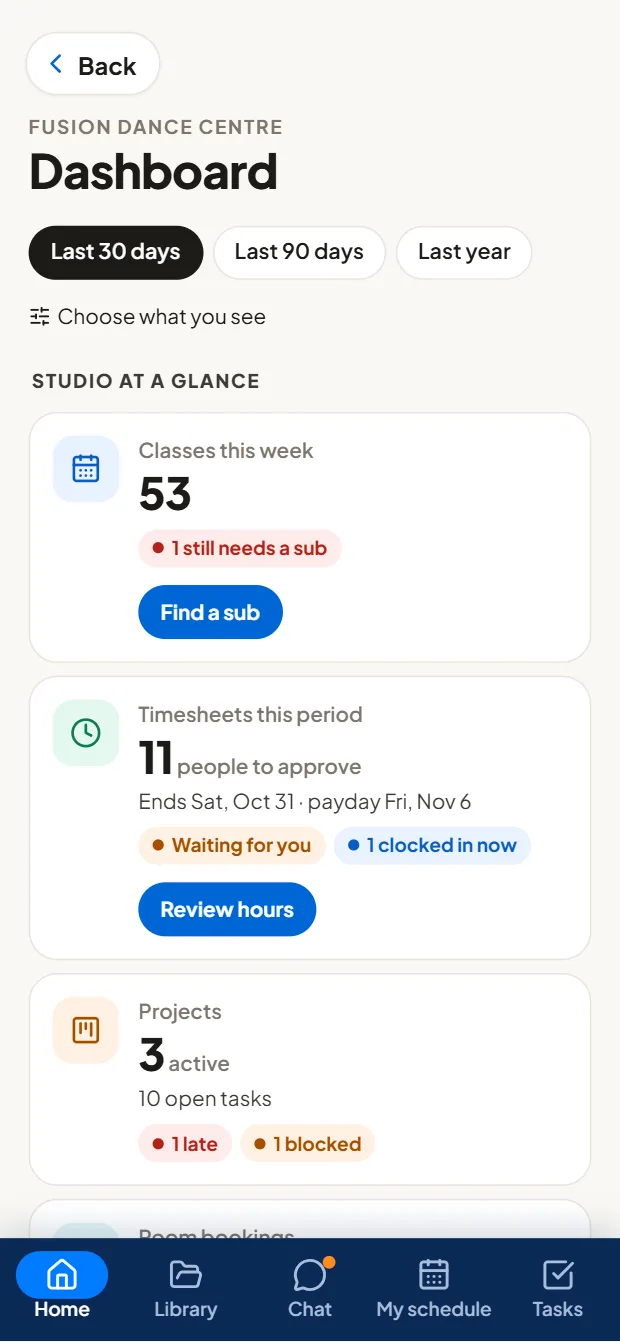
You didn't open a studio to spend your days finding substitute teachers, chasing timesheets, fixing payroll mistakes, or reminding everyone what needs to get done. TeamSpot takes care of the busywork: it finds substitutes for you, catches payroll errors before payday, and keeps recital projects, schedules, teaching materials and staff chat in one place.
Keep your existing enrollment software. No switching required.
Setup takes less than an hour, with our step-by-step Setup guide
No sign-up for the demo. Unlimited staff on every plan. Built by a studio owner of 22 years.
Sound familiar?
TeamSpot brings your people, schedules and information together, so you can stop managing everything by hand.
Keep your enrollment software. Replace the operational chaos.
Your registration, tuition and billing system stays exactly as it is. TeamSpot runs everything behind it: your team, your classes and your studio's day-to-day operations.
- No student database or tuition to move
- Bring your class schedule in from your studio software's export
- Staff get one app; families never see it
All the little things that run your studio. Finally in one place.
Everything your team juggles today, in an app they'll actually open.
- Group texts and chat appsTeam chat, and announcements staff confirm they've read
- A shared Google CalendarOne studio calendar, synced both ways with everyone's phone
- Notes, sticky notes and bindersClass notes, notes for the sub and the syllabus, right on the class
- Monday.com, Trello or spreadsheetsProjects and tasks made for studios
- Back-and-forth emailsAsk the right department, and see it through to done
- "Did anyone do that?"Every task assigned, dated and accounted for
- Clipboard teacher reviewsClass observations and feedback, with teacher replies
- Paper timesheets and payroll spreadsheetsA time clock and pay periods, ready to export
- Rebuilding the recital plan every yearProject templates you reuse every season
- Endless texts to find a meeting timeEveryone's availability and the invite, in one place
- Wondering who's doing too muchEveryone's workload for the week, at a glance
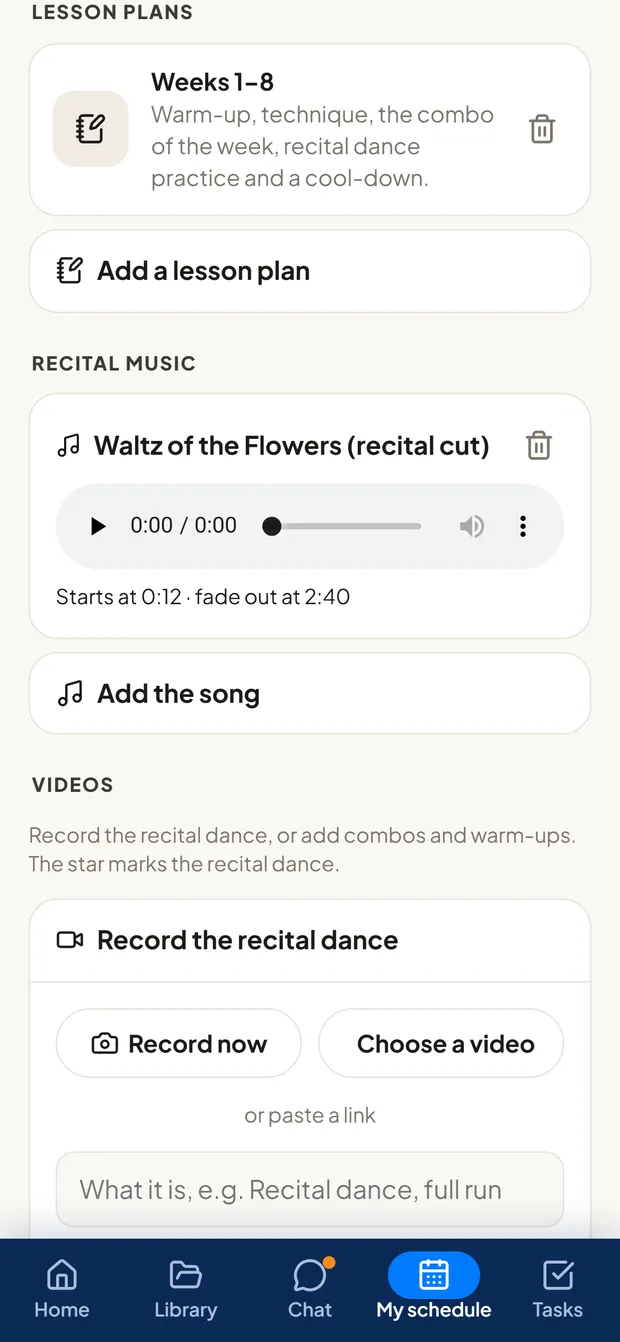
Syllabus, class music, recital videos and lesson plans. All in one place.
Everything for each class, on the teacher's phone, so nobody walks in unprepared, not even the sub.
- The syllabus by class type and level, in sections teachers can follow
- Class and recital music with its start and fade-out times, and playlists that open in Spotify or Apple Music
- Recital and choreography videos recorded from a phone, filed by class in your own Google Drive
- Lesson plans and notes for the sub, right on the class
Scheduling without chaos
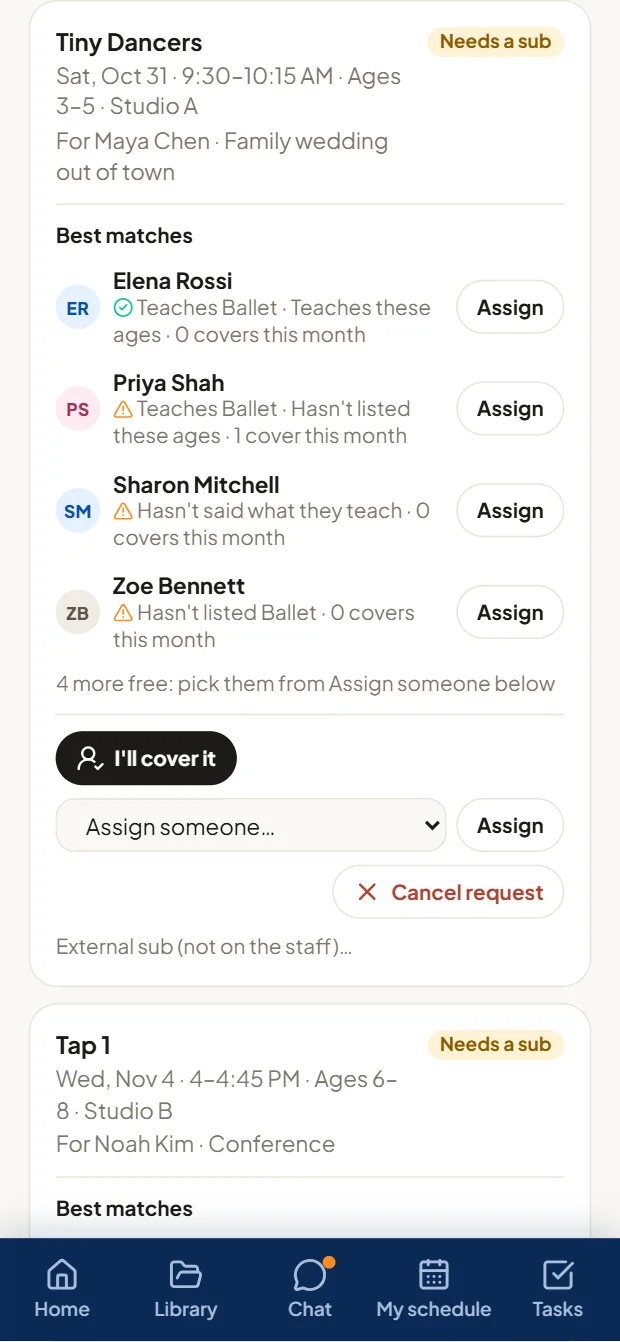
Every class covered, and every teacher and room where they should be.
- Sub requests go out the moment time off is approved; the first match to accept is assigned
- Each class and lesson checked against the teacher's and room's other bookings, every week it meets
- Import your schedule from a spreadsheet, a Google Sheet or your studio software
- Classes and shifts on everyone's phone calendar, synced both ways
Recital and competition ready
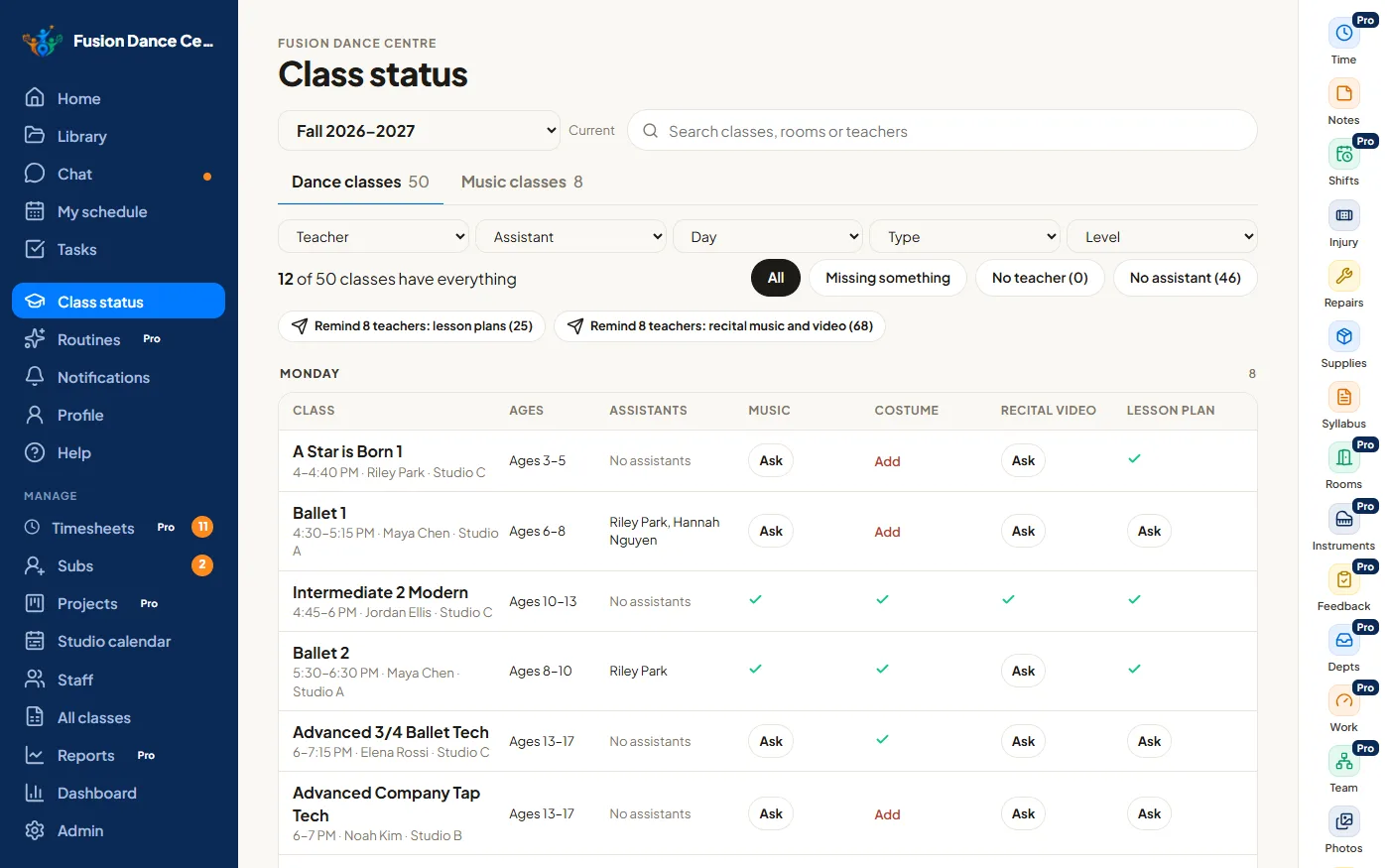
See which classes and routines are ready for the show, and what's still missing, weeks before it's a problem.
- Class status: music, costume, recital video and lesson plan for every class, with Ask buttons for what's missing
- Routine status: dancers, last rehearsal, music, costume and video for every routinePro
- Remind every teacher who still owes something, in one tap
- Rehearsals planned across your rooms, then running order, call times and costume checklistsPro
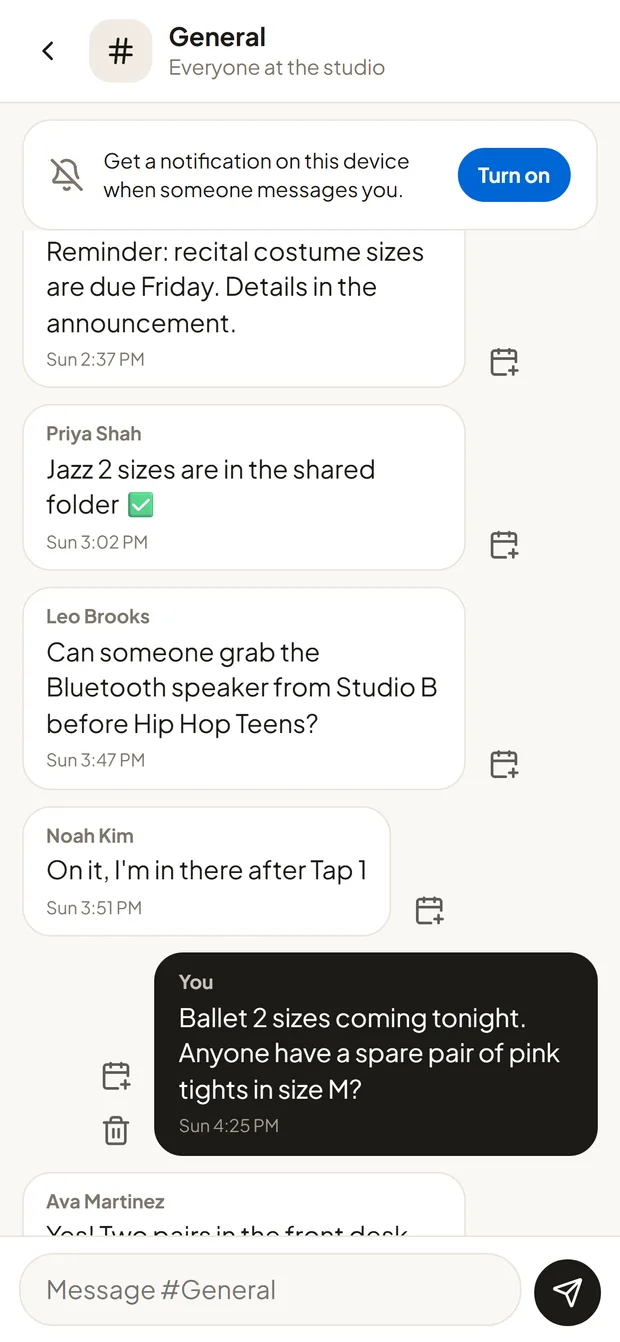
Communication that works
Team chat instead of group texts, and proof that people read the important announcements.
- Studio-wide channels and private chats
- Announcements staff confirm they've read, sent now or scheduled
- Book a meeting around everyone's availability
- A private line to the owner for sensitive questions
Payroll without the headaches
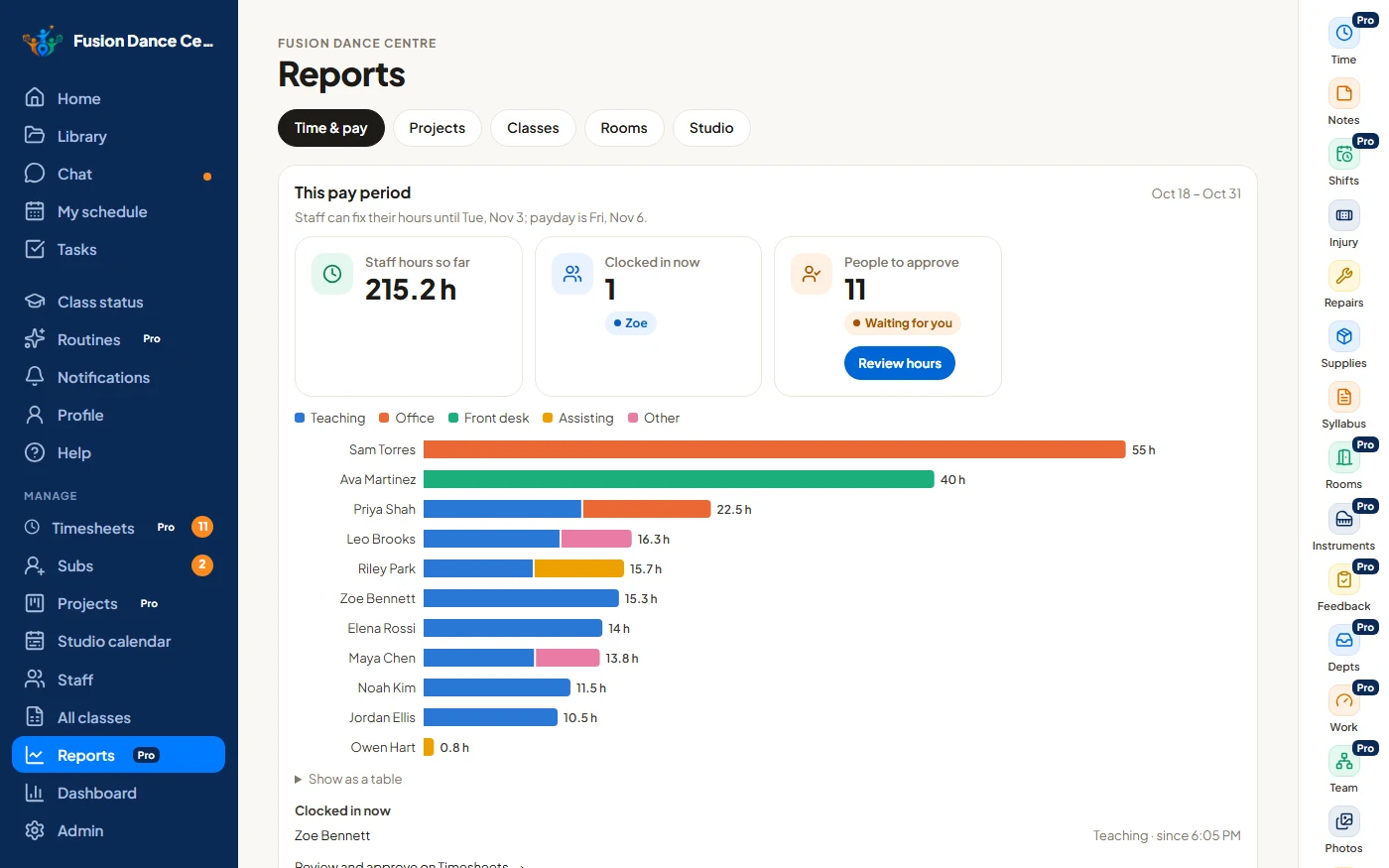
TeamSpot checks the hours for you and shows where every hour goes, so payday isn't spent hunting for mistakes.
- Missed clock-outs, classes with no hours, overlapping entries, 40+ hour weeks and time that doesn't match the schedule, flagged
- One-click fixes, then approve everyone who's ready at once
- Reports of everyone's hours by kind of work, and exports for your payroll provider. TeamSpot prepares the hours; it doesn't run payroll
Know how every teacher is doing
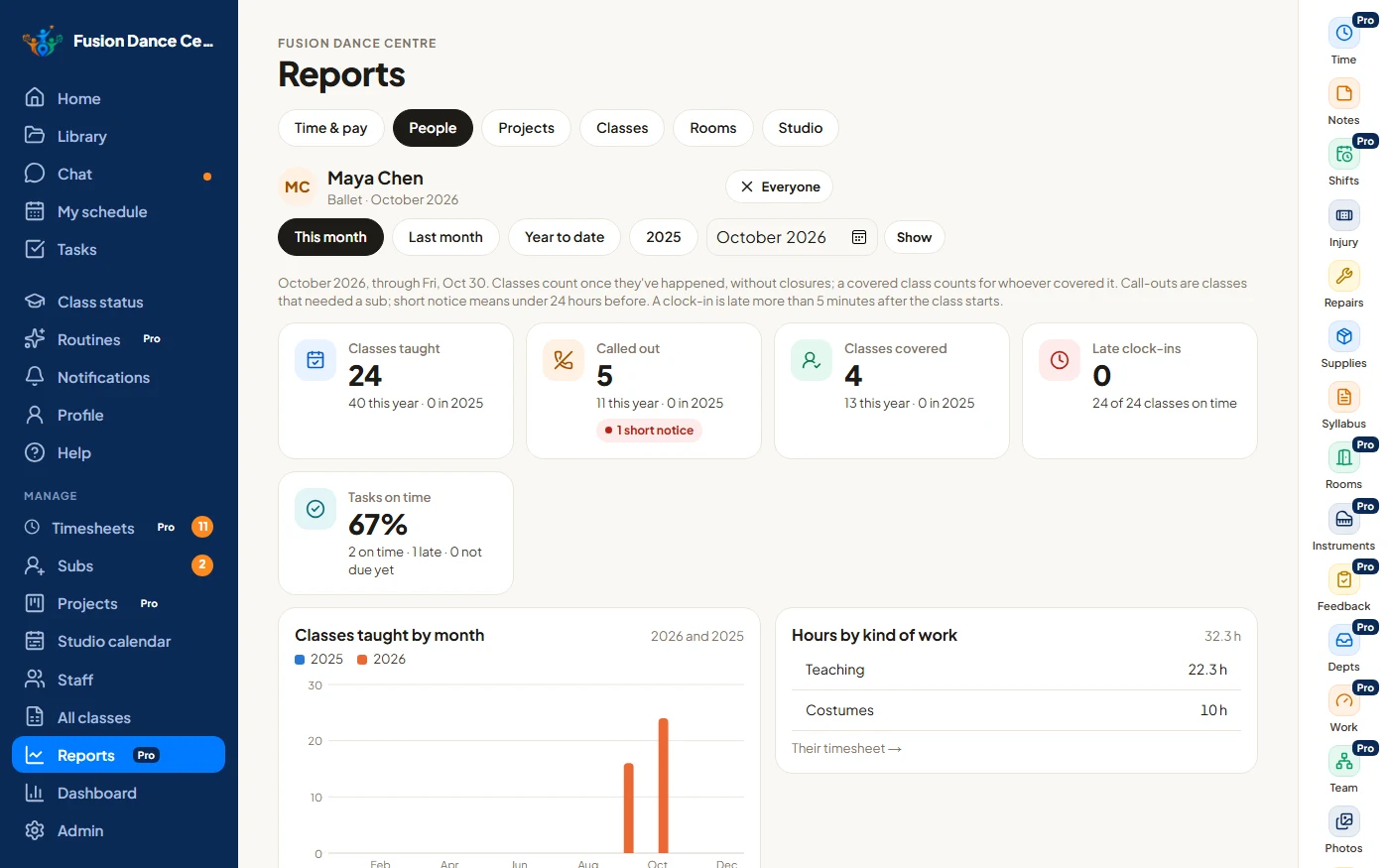
Each person's record in one place, so reviews, raises and scheduling are based on facts, not memory.
- Classes taught this month, year to date and last year, month by month
- Call-outs, including how many were short notice, and the classes they covered for others
- Late or missing clock-ins for classes, with how late
- Tasks done on time, and hours by kind of work
- Admins see everyone; directors see the people who report to them
A more accountable team
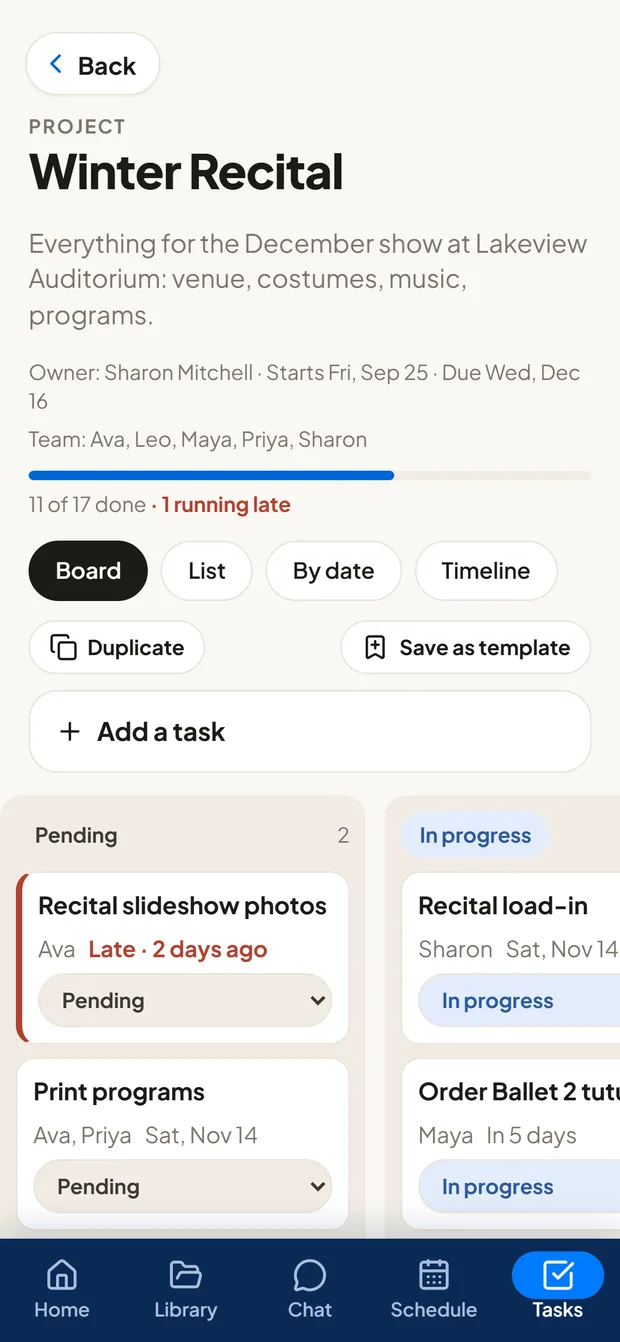
Know what's getting done, what's late and who's carrying too much.
- Tasks with an owner, due date, reminders and checklist
- Project boards, timelines and templates you reuse every seasonPro
- Late and blocked work flagged, and everyone's workload for the weekPro
- Directors observe classes and give feedback teachers reply toPro
A studio that runs smoothly
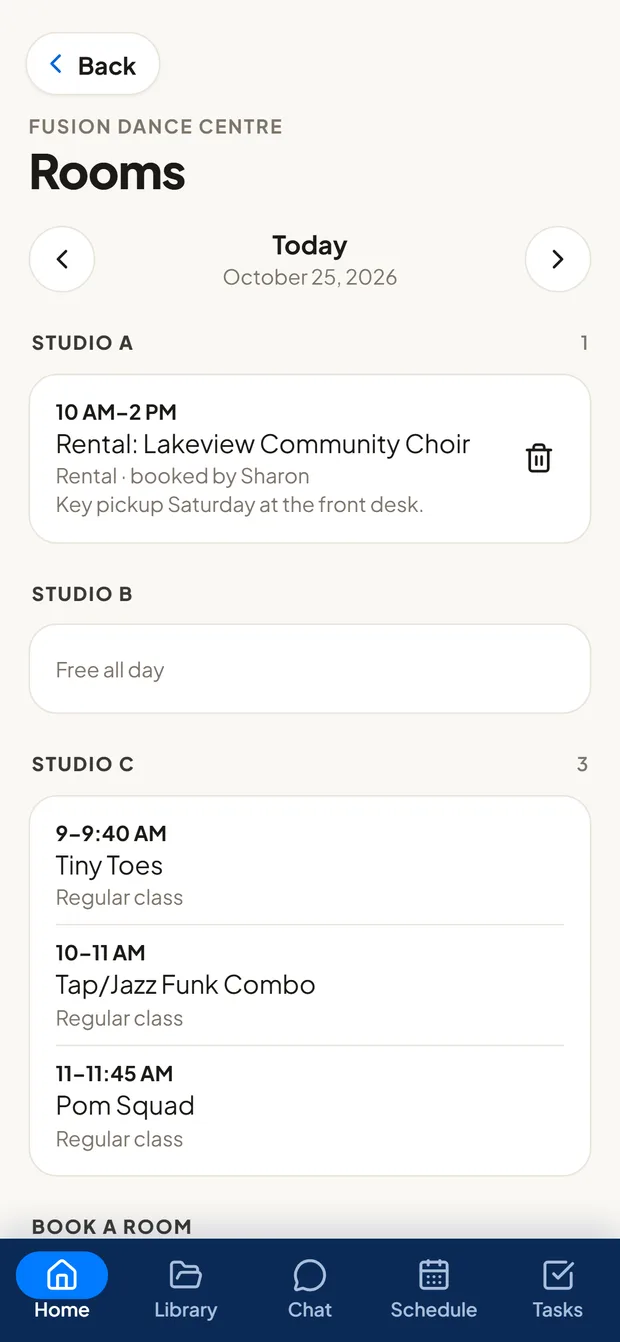
The day-to-day running of the building, handled and tracked to done.
- Rooms that can't be double-booked, for lessons, rehearsals, parties and rentalsPro
- Repairs, supplies and injury reports, reported from a phone
- One approvals inbox, and closures that take classes and shifts off the schedule
- Several locations under one account and one invoice
One app for dance studios, music schools, or both
An admin picks dance, music or both for each location, and the right tools appear. Switch off anything you don't use. Same plans and prices whichever you choose.
Ready to use in under an hour
Upload your Excel file or Google Sheet, or your studio software's export. Your rooms, styles, levels and ages are set up for you.
Paste in your teachers' names and emails. They tap the invite, and their classes are already on their schedule.
Class videos and files go straight into your own Drive, filed by class. Then you're ready.
A step-by-step Setup guide inside TeamSpot walks you through it, and Show me around gives you and your teachers a quick tour of the app.
Built by people who understand studio operations.
22 years of dance studio experience. 15 years of software development. One solution built from real experience.
“For 22 years, I ran a dance studio with over 1,300 students and more than 40 staff members. The dancing was never the hard part. The real challenge was keeping everyone organized and on the same page.
And then there was payroll day: collecting timesheets, reviewing hours, tracking down what was missing and correcting mistakes. Time that could have been spent growing the studio instead of managing paperwork.
So I built the tool I always wished I'd had.”
Simple pricing
Unlimited staff on every plan. Same price for dance, music or both. Pay yearly and get two months free.
Essentials
- Unlimited staff: one price for the whole studio
- Chat, announcements and push notifications
- Class schedules, subs with notes for the sub, and reminders
- Library with 2 GB of files, plus videos in your own Google Drive
- Event photos, polls, shout-outs, tasks and notes
- Repairs, supplies and injury reports
- Search across FAQs, documents (even inside PDFs), dates and announcements
- Directors, and features you can switch on or off
- Dashboard for the last 30 days
Pro
Save time every pay period with automatic timesheet checks and one-click corrections.
- Everything in Essentials, plus:
- Time clock and timesheets, with a pay period that repeats
- Timesheet checks: missed clock-outs, classes with no hours and overlaps flagged before payday
- One-click fixes, approvals and exports for your payroll provider
- Class observations and feedback from directors
- People reports: each person's classes taught, call-outs, covers, late clock-ins and tasks on time
- Projects with boards, timelines and history; routines with their music, videos and costume
- Rooms that can't be double-booked, shifts with swaps, and the full dashboard with reports
- For music schools: the school's instruments, checked free for every lesson
- Departments, org chart, teams and a Work overview
- Search also reads your studio's own website, and 20 GB of files
No setup fee: most studios set up in under an hour. Rather hand it off? We'll do it for $499 one time. Compare plans and setup options →
Questions
Do we have to replace our enrollment software?
No. TeamSpot works alongside whatever you use for registration, tuition and families. It runs your staff side: schedules, subs, class materials, timesheets, recitals and communication. You can bring your class schedule in from your studio software's export.
Is there a setup fee?
No. Most studios set TeamSpot up themselves in under an hour with the free step-by-step Setup guide. If you'd rather have help, we'll do it for you for a one-time $499: we import your staff and class schedule, organize your syllabuses and materials, and set up your calendar and roles.
Do you store student information?
There's no student database. The only student details are the few staff need: a name on an injury report, the student's name on a private lesson, or a photo opt-out note on a class, visible only to the people who need them.
Does it work for music schools?
Yes. TeamSpot is one app for dance and music: tick Music (or both) when you sign up. Private lessons come first on the schedule, instruments are your class types, and TeamSpot checks the teacher and room are free every week before a lesson is saved (and, with Pro, that one of the school's instruments is too). Lessons show on teachers' schedules and timesheets like any class. Started with dance and added music? An admin turns Music on in Studio settings; nothing is lost.
How secure is it?
Every studio's information is kept completely separate, and the database itself checks who may see each record, so a mistake in the app can't show one studio's data to another. Everything is encrypted in transit, and connections like Google Drive are stored encrypted.
Do my teachers need to download an app?
No. They open a link on their phone and add it to their home screen; it works like an app, with notifications.
Is there a free trial?
You don't need one: the demo is the real app with a full studio in it. Try it as a teacher, a director or the owner, on your phone or computer, with no sign-up. When you're ready, sign up monthly or yearly (two months free).
What's the difference between Essentials and Pro?
Essentials has everything staff use day to day: chat, schedules and subs, the library, tasks, repairs and Search. Pro adds timesheets (the time clock, timesheet checks, approvals and exports), shifts and rooms, departments, projects, routines, directors' class feedback, the org chart and work overview, the full dashboard and more storage. You can switch any time; moving to Essentials hides Pro features but never deletes anything.
Is it per teacher?
No. Every plan includes unlimited staff. Multi-location businesses pay per location, with $10 off every location after the first.
Can we cancel?
Yes, any time, from Billing in the app. Your plan ends on the last day of the billing period you've paid for, and nothing more is charged. Nothing is deleted, so you can come back any time.
Contact us
Wondering whether TeamSpot fits your studio or school, how setup works, or how it would handle the way you run payroll? Ask away. Someone who built TeamSpot will reply by email.
Or email hello@teamspot.app.
See how TeamSpot works with a real studio.
Click around the real app as an owner, director, teacher or front desk. Sample data, nothing saved, no sign-up.